301 Redirect Cheatsheet
 Ultimate Redirect Cheatsheet for multiple programming languages. Redirecting Users with Javascript redirect, meta refresh redirect, and php redirect, also htaccess methods, python, coldfusion, asp, perl, etc.
Ultimate Redirect Cheatsheet for multiple programming languages. Redirecting Users with Javascript redirect, meta refresh redirect, and php redirect, also htaccess methods, python, coldfusion, asp, perl, etc.
 This is a big update from the last time I looked into this, when I enumerated 57 Status Codes that Apache 2.x was capable of handling. This list contains 83 Status Codes recognized by Apache. I compiled the latest 2.4.4 Apache in order to view the actual codes sent by a live server.. very cool. You can read about the newest HTTP Status Codes in RFC 6585.
Web Professionals use mod_rewrite to issue 301 and 302 Redirects for Search Engines. Sometimes you may not have mod_rewrite.c or you want an alternative redirect method. Using mod_alias RedirectMatch you can use REGEX in Redirect commands!
There are a total of 57 HTTP Status Codes recognized by the Apache Web Server. Wouldn't you like to see what all those headers and their output, ErrorDocuments look like?
#### No https except to wp-admin -
# If the request is empty ( implies fopen or normal file access by a php script )
RewriteCond %{THE_REQUEST} ^$ [OR]

# OR if the request if for wp-admin or wp-login.php
RewriteCond %{REQUEST_URI} ^/(wp-admin|wp-login.php).*$ [NC,OR]

# OR if the Referer is https
RewriteCond %{HTTP_REFERER} ^https://www.askapache.com/.*$ [NC]

# THEN skip the following rule, basically all this does is force https or badhost to be redirected
# BUT because of the above 3 rewritecond's, this won't break poorly written admin scripts
RewriteRule .* - [S=1]

RewriteCond %{HTTPS} =on [OR]
RewriteCond %{HTTP_HOST} !^www.askapache.com$ [NC]
RewriteRule .* https://www.askapache.com%{REQUEST_URI} [R=301,L]

RewriteCond %{THE_REQUEST} ^[A-Z]{3,9} /(wp-admin/.*|wp-login.php.*) HTTP/ [NC]
RewriteCond %{HTTPS} !=on
RewriteRule .* https://%{SERVER_NAME}%{REQUEST_URI} [R=301,L]
 .htaccess is a very ancient configuration file for web servers, and is one of the most powerful configuration files most webmasters will ever come across. This htaccess guide shows off the very best of the best htaccess tricks and code snippets from hackers and server administrators.
You've come to the right place if you are looking to acquire mad skills for using .htaccess files!
 Learn about the 7 different HTTP response codes specifically reserved for redirection. 301, 302, 303, 304, 305, and 307.
SSLOptions +StrictRequire
SSLRequireSSL
SSLRequire %{HTTP_HOST} eq "google.com"
ErrorDocument 403 https://google.com
Some of the Ins and Outs of using SSL Connections with Apache.
Using FastCGI on DreamHost and .htaccess
 We've figured out what mod_rewrite variables look like, a cheatsheet of the actual value.
 FeedBurner is so RAD! I love it. Here's an alternative method to redirect scrapers and feed requests to your feedburner url, in my case, I use Branding by feedburner, which is so hot, taking advantage of CNAMEs in your DNS record.
thought I'd take a break from coding and post about how open-source is such a great tool for finding the best answers to the toughest questions,
/** is the status code informational */
#define ap_is_HTTP_INFO(x)         (((x) >= 100)&&((x) < 200))
/** is the status code OK ?*/

#define ap_is_HTTP_SUCCESS(x)      (((x) >= 200)&&((x) < 300))
/** is the status code a redirect */
#define ap_is_HTTP_REDIRECT(x)     (((x) >= 300)&&((x) < 400))

/** is the status code a error (client or server) */
#define ap_is_HTTP_ERROR(x)        (((x) >= 400)&&((x) < 600))
/** is the status code a client error  */

#define ap_is_HTTP_CLIENT_ERROR(x) (((x) >= 400)&&((x) < 500))
/** is the status code a server error  */
#define ap_is_HTTP_SERVER_ERROR(x) (((x) >= 500)&&((x) < 600))

/** is the status code a (potentially) valid response code?  */
#define ap_is_HTTP_VALID_RESPONSE(x) (((x) >= 100)&&((x) < 600))
How to password-protect, Allow or Deny a visitor based on a condition. If you are having trouble getting htaccess-based password protection to work see: Troubleshooting htaccess Authentication: Getting it to work
This is all new, experimental, and very very cool. It literally uses .htaccess techniques to create several virtual "locked gates" that require a specific key to unlock, in a specific order that cannot be bypassed. It uses whitelisting .htaccess tricks to specify exactly what is allowed, instead of trying to specify everything that isn't allowed. Also, by setting specific cookies/tokens after successfully passing through a gate, we can then require the exact cookie/token from the previous gate, which stops an attacker from skipping or bypassing gates.
.htaccess Topic vs htaccess Keyword
Some of my favorite htaccess examples from some of my favorite .htaccess tutorials. These cut-and-paste ready htaccess code snippets are very useful for website and server administrators.
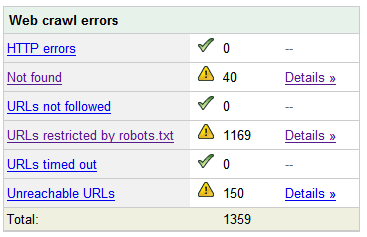 Nifty SEO tip to get Search Engine Bots to check your site every hour until you finish working on it and tell them you are finished.
Ever wanted to execute commands on your server through php? Now you can. I'm calling this file (see below) shell.php and it allows you to run commands on your web server with the same permissions that your php executable has.
 The secrets in this post were really more of enlightening bits of seo wisdom. The secret is how to combine robots.txt with meta robots tags to control pagerank, juice, whatever.